
FAQ
Pre podrobný videonávod a postup prihlásenia do portálu kliknite SEM.
1. Ako postupovať pri prihlásení / Ako sa prihlásim?
2. I need help downloading my test results.
3. I need help with sharing my test results.
4. I need help forwarding images via PACS.
5. Čo je to ERADIOLOGIA ? Aké funkcionality ponúka?
6. How long does it take to receive the test results? When will I have access to my test results?
7. Will I be notified once test results are ready?
8. Čakám už dlhšie ako 14 pracovných dní, čo mám robiť?
9. What can I do with my images and test results on the portal?
10. How can I share my images and test results?
11. Can I share my test results with another doctor?
12. What options do I have for obtaining my test results?
13. When will my test results be delivered to the doctor if I selected the “SEND TO DOCTOR” option?
14. When can I pick up my test results if I chose the “PICK UP IN PERSON” option?
15. Prečo mi nefunguje prihlásenie?
16. Mám problémy s prístupovým kódom, čo mám robiť?
17. What should I do if I need to change my account information?
18. Po zadaní RČ ukazuje neaktuálne telefónne číslo. Je možné informácie aktualizovať?
19. What should I do if I changed my phone number and can’t access my account?
20. What should I do if I paid the fee but didn’t receive the SMS code?
21. What should I do if I can’t load the complete study?
22. What should I do if I can’t load key images?
23. What should I do if I have an Apple computer running macOS?
24. Môžete moje výsledky odoslať lekárovi kvôli ďalšiemu vyšetreniu?
25. Prečo nedávate na pracovisku CD? Môj lekár požaduje CD so snímkami.
26. Musím žiadať o kód pri každom prihlásení? Musím platiť pri každom prihlásení?
27. Je nutné ísť po výsledky osobne?
28. Je možné poslať výsledky aj na email?
1. AKO POSTUPOVAŤ PRI PRIHLÁSENÍ / AKO SA PRIHLÁSIM?
Po otvorení webovej stránky www.ERADIOLOGIA.sk vo Vašom prehliadači vidíte vľavo modrú časť „PRE PACIENTOV“ kde je potrebné napísať svoje rodné číslo bez lomítka a spolu. Následne kliknite na „OVERIŤ“. Dostanete sa k prihláseniu pacienta. Pre prihlásenie a aktivovanie svojho účtu je potrebné zaplatiť poplatok. Suma sa líši v závislosti od spôsobu platby. V prípade, ak nevlastníte platobnú kartu, pri voľbe "ONLINE PLATBA" je prítomný aj link na platbu prostredníctvom SMS správy.
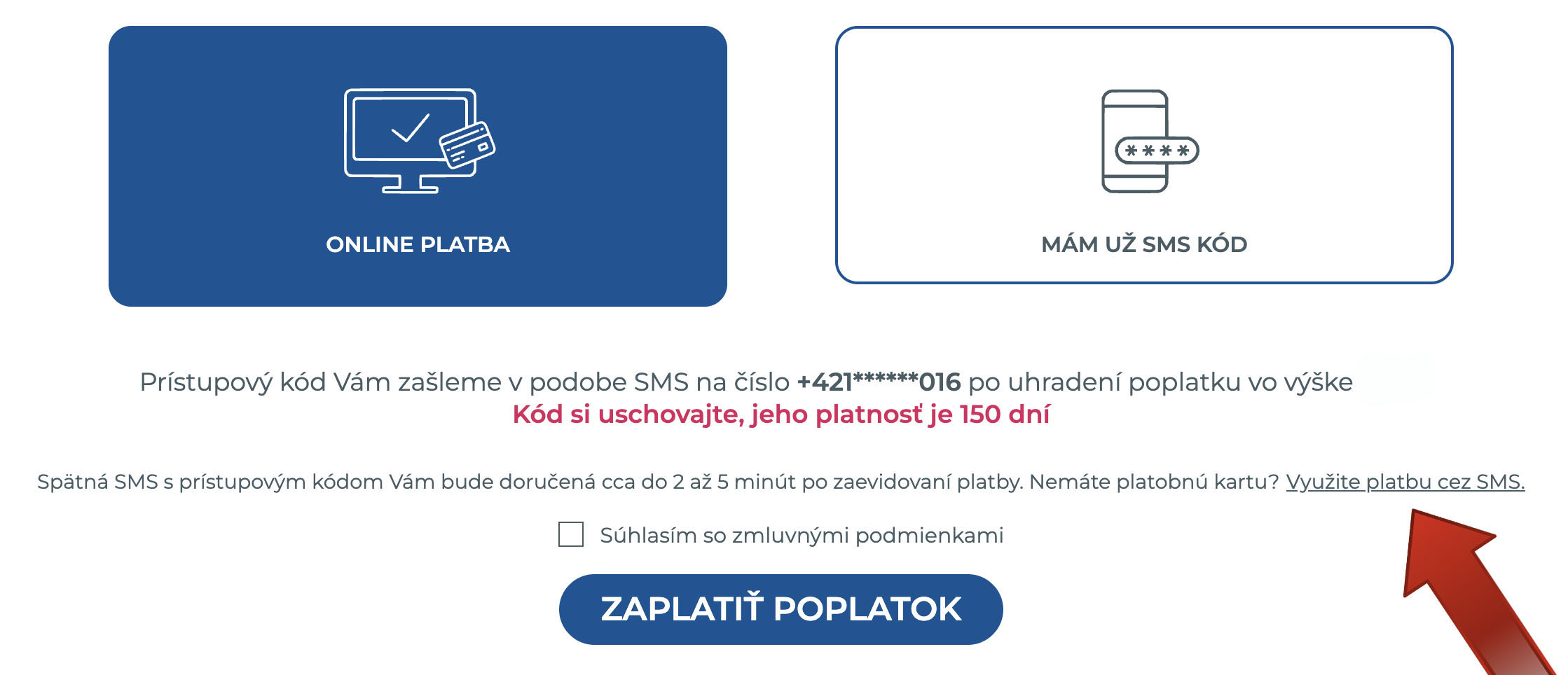
1. "ONLINE PLATBA“ - cez Vašu platobnú kartu, skrz platobnú bránu. Platba je stiahnutá z Vášho účtu potom, ako zadáte v platobnej bráne príkaz Vašej banke. Následne po platbe Vám bude automaticky vygenerovaný prihlasovací kód do portálu a odoslaný na Vaše tel. číslo.
2. "SMS PLATBA" (v prípade, ak nevlastníte platobnú kartu) – poslaním SMS s textom RDG(medzera)XXXXXX na číslo 7405 (text SMS je vygenerovaný každému pacientovi zvlášť, znaky XXXXXX sú len ilustračné). Následne po odoslaní SMS Vám bude automaticky stiahnutý poplatok a vygenerovaný prihlasovací kód do portálu, ktorý Vám príde obratom na Vaše tel. číslo.
V prípade, že ste kód nedostali do 30. min nežiadajte oň znova, ale kontaktujte správu portálu na info@prodiagnostic.sk . Operátori niekedy blokujú odosielanie takýchto spätných SMS, z doposiaľ nezistených príčin. Určite nie je potrebné ani žiadané posielať SMS viac ako 1 krát. Platnosť kódu, ktorý Vám príde SMS správou je 150 dní. Tento kód môžete používať na opakované prihlásenia počas tejto lehoty. Po 150 dňoch platnosť kódu vyprší a až vtedy je potrebné poslať ďalšiu SMS.
Po odsúhlasení zmluvných podmienok a zadaní kódu z SMS do políčka „Zadajte kód z SMS“ kliknite na možnosť „POTVRDIŤ KÓD“.
Vitajte vo svojom účte na portáli www.ERADIOLOGIA.sk .
2. I NEED HELP DOWNLOADING MY TEST RESULTS.
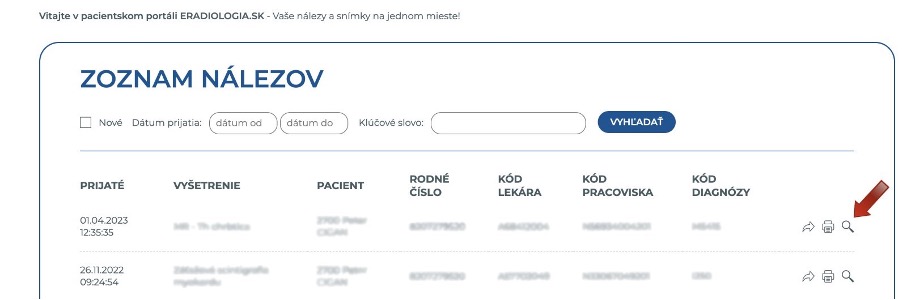
Once you log in to the portal, you'll see a list of test results displayed on the main page. To access the MRI report and images (study) for a specific test result, simply click the "magnifying glass" icon located at the end of the corresponding line on the far right.
In the opened window, the test results (the MRI report) will be displayed on the left side of the screen, while a list with dark blue buttons will appear on the right.
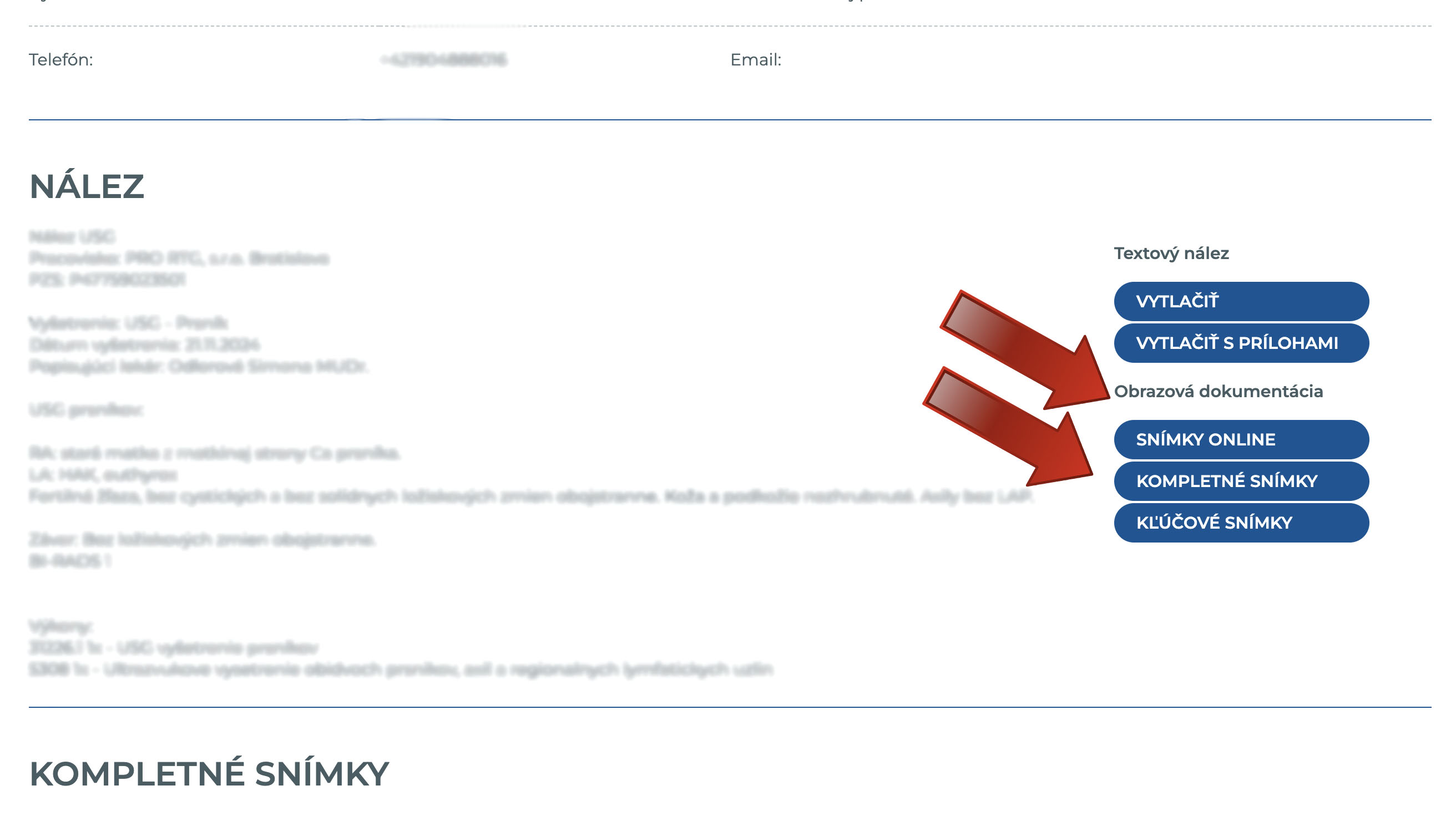
By clicking on the "ONLINE STUDY" option, you'll be redirected to TomoCon GO, where you can view your images directly without needing to save them to your computer. Please note that these images are provided in lower quality.
By selecting the "COMPLETE STUDY" option, the images from your study will begin to load. You can monitor the loading progress on the portal beneath the description. Once the loading is finished, you'll have the option to “DOWNLOAD DICOM STUDY.”
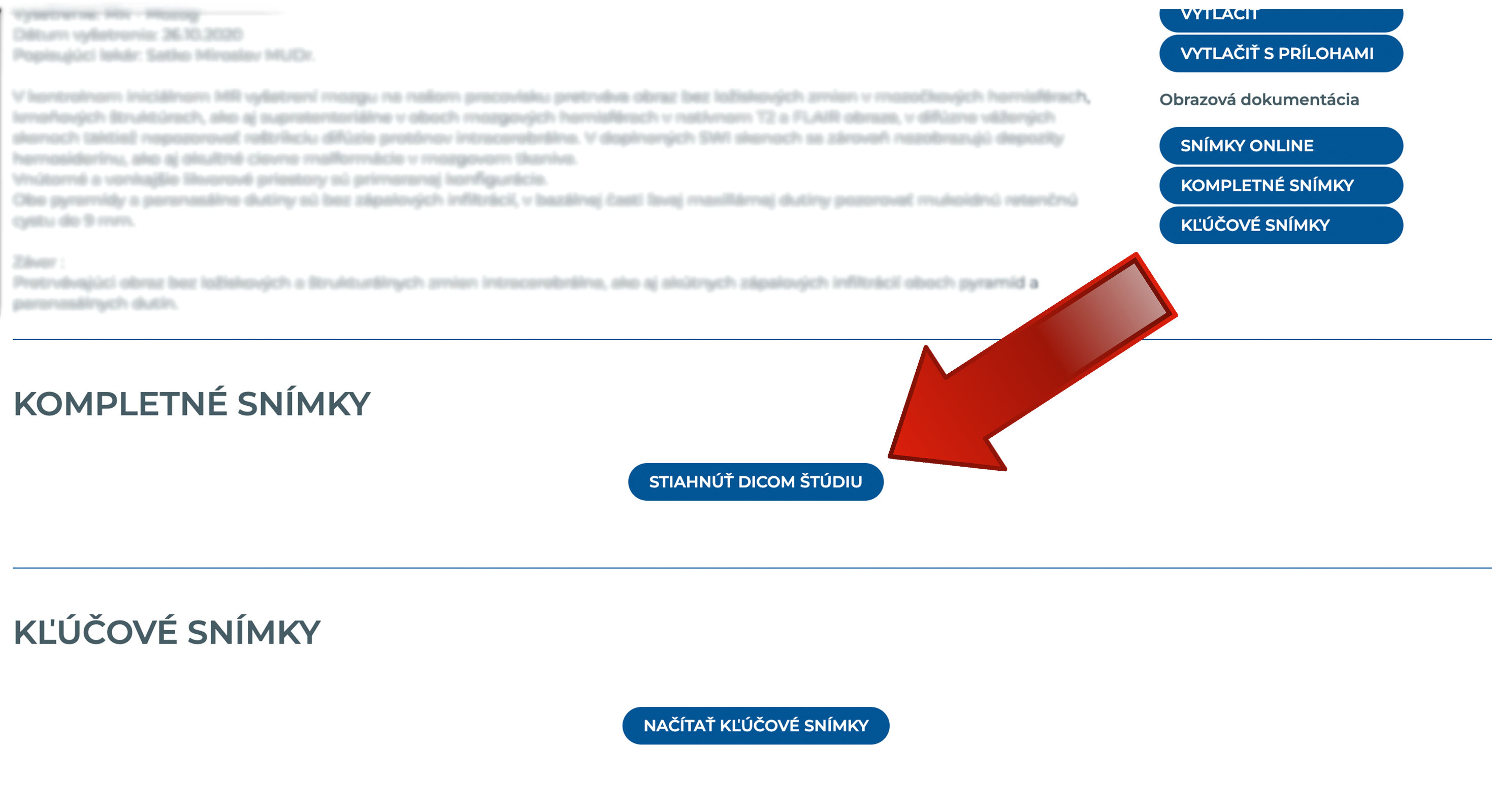
The images will be provided in high-quality DICOM format, and due to the large volume, they will be saved to your computer as a .zip file. This file will need to be unzipped. After extracting the contents, you can access your images in high resolution by clicking on the TomoCon Lite.exe file. Please note that these images are intended for healthcare professionals who are trained to interpret them.
To view the images on computers running macOS (Apple operating system), you'll need to download a DICOM viewer compatible with macOS. You have two options:
Osirix https://www.osirix-viewer.com/
Horos https://horosproject.org/
3. I NEED HELP WITH SHARING MY TEST RESULTS.
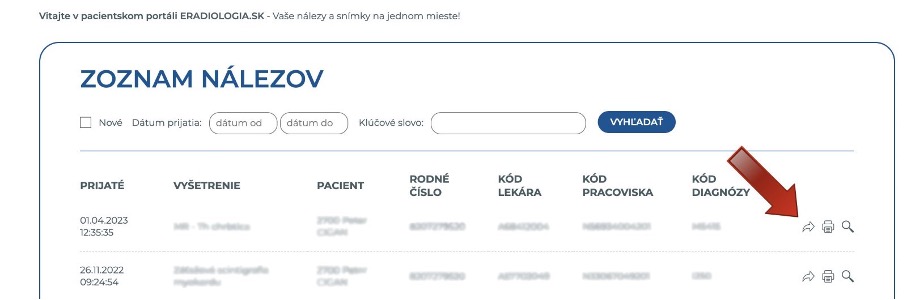
You can also share your report through the portal with a doctor who was not the one to refer you for the MRI but requires it for further treatment. Once logged into the portal, you'll find a list of your reports on the homepage. To share a report, click the "arrow" icon at the end of the corresponding row (on the right), which will take you to the sharing page.
Under the "RECIPIENT" section, enter the recipient's email address (the doctor you wish to share the report with) and click the blue "Share" button.
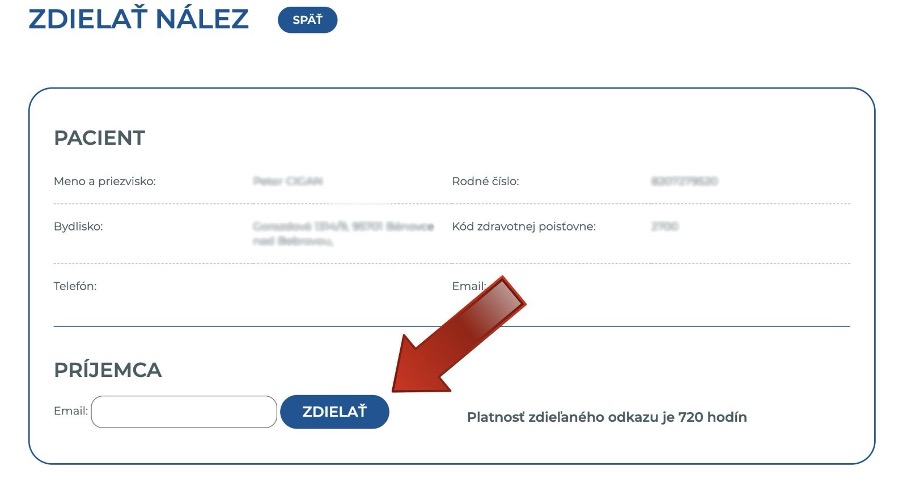
A link to the selected MRI report’s page will be sent to the recipient's email address. This link will remain valid for 30 days. By clicking on the link in the email, the doctor will be directed to the same report page that you can view in your account. The recipient does not need to be registered on the portal to access the shared report.
4. I NEED HELP FORWARDING IMAGES VIA PACS.
If your doctor requests that images be sent through the PACS system (a platform for archiving and distributing medical imaging documentation compatible with the DICOM standard), please contact the facility where your examination was conducted or reach out to the portal administration at info@eradiologia.sk. In your email, include the location and date of your examination, as well as the hospital to which the images should be sent.
5. ČO JE TO ERADIOLOGIA ? AKÉ FUNKCIONALITY PONÚKA?
Je elektronický portál, kde nájdete výsledky svojich vyšetrení magnetickou rezonanciou absolvovaných v sieti zapojených pracovísk. Pacienti už nemusia cestovať a opätovne navštevovať pracoviská po popísaní výsledkov. Vo svojom konte nájdu všetky výsledky z vyšetrení absolvovaných v diagnostických centrách spoločnosti, ktoré si vedia prezrieť, uložiť alebo zdieľať pre ďalšiu diagnostiku a komplexnú liečbu.
Portál je prístupný pre pacientov, ale aj pre odosielajúcich lekárov. Spoločnosť Pro Diagnostic Group je lídrom aj v oblasti elektronických riešení – e-komunikácia s pacientmi, odporúčajúcimi lekármi a diagnostickými centrami. Portál vyvinula a prevádzkuje v spolupráci s odborníkmi. Lekári posielajú ežiadanky priamo do informačných systémov zapojených pracovísk a ihneď po popísaní rádiológom získajú späť úplnú štúdiu, vrátane popisu. Odosielajúci lekári nájdu NÁLEZY A SNÍMKY NA JEDNOM MIESTE ONLINE A Z POHODLIA DOMOVA či svojej ordinácie.
The ERADIOLOGIA.sk portal offers patients a range of useful features:
- NOTIFICATIONS: Receive alerts as soon as the radiologist completes the image descriptions.
- ONLINE ACCESS: View all medical reports and images from your completed examinations conveniently online.
- SHARING TEST RESULTS: Easily share your test results with other doctors, including those who did not originally refer you for the examination
- Security and Privacy: Rest assured that your sensitive health data is securely protected.
6. HOW LONG DOES IT TAKE TO RECEIVE THE TEST RESULTS? WHEN WILL I HAVE ACCESS TO MY TEST RESULTS?
The time it takes to prepare an MRI report can vary based on several factors, including the complexity of the examination, the patient volume, and the capacity of the facility. Generally, at Pro Diagnostic Group centers, test results are available within 7 to 14 business days after the examination. In more complex cases or during periods of higher demand, the process may take longer. You can also access the test results online through the portal, which expedites the delivery of test results for both you and your treating physicians.
7. WILL I BE NOTIFIED ONCE TEST RESULTS ARE READY?
Once the radiologist completes an MRI report, you will receive a notification via SMS. Immediately after your examination, you can register on the website www.ERADIOLOGIA.sk for the “WAITING LIST.” By entering your birth identification number, you’ll be informed that your test results are not yet available, but you can be added to the waiting list by providing your contact information.
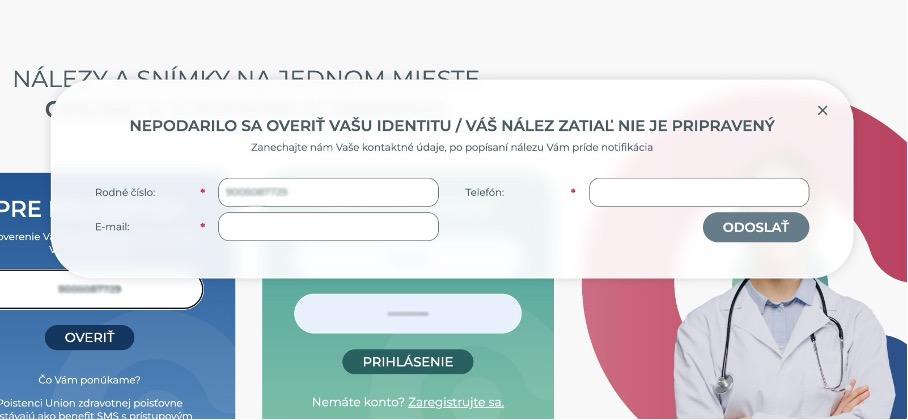
As soon as the doctor finalizes the MRI report, it will be uploaded to the system, and you will receive a notification. You can then log in to view, download, or share the MRI report right away. This means you no longer need to travel for your MRI report, wait in line, or coordinate your visits with work or other commitments.
8. ČAKÁM UŽ DLHŠIE AKO 14 PRACOVNÝCH DNÍ, ČO MÁM ROBIŤ?
Čas potrebný na vyhotovenie popisu snímok závisí od rôznych faktorov, ako sú náročnosť vyšetrenia, objem pacientov a kapacita pracoviska. Vo všeobecnosti, v centrách Pro Diagnostic Group, môžu byť výsledky dostupné v priebehu 7 až 14 pracovných dní po vyšetrení. V prípade komplikovanejších prípadov alebo vyššej pracovnej záťaže môže popis trvať aj dlhšie. Tieto lehoty je potrebné mať na zreteli aj pri plánovaní nadväzných vyšetrení. Ak na výsledky vyšetrenia čakáte dlhšie, prosím, kontaktujte správu portálu na info@eradiologia.sk . Existuje možnosť, že boli pri vyšetrení zadané zlé údaje a preto ste neboli doteraz notifikovaní.
9. WHAT CAN I DO WITH MY IMAGES AND TEST RESULTS ON THE PORTAL?
After registering on the portal, you gain access to view, print, download, and share your medical report and images. Findings can be downloaded from the portal and saved to your computer, allowing you to burn them onto a CD or transfer them to a USB drive to bring to your treating doctor. Additionally, you can use the portal’s sharing feature to send your medical report directly to the email address of the doctor who referred you for the examination or to any future treating doctors. The recipient will receive a secure link to preview your account. For privacy and security reasons, this link is valid for 30 days.
10. HOW CAN I SHARE MY IMAGES AND TEST RESULTS?
To utilize this feature, simply provide the email address of the doctor you wish to share the findings with. An online sharing link will be sent to that email address, and upon opening it, the recipient will have access to a preview of your account. For security purposes, this link will remain active for only 30 days.
11. CAN I SHARE MY TEST RESULTS WITH ANOTHER DOCTOR?
Absolutely! You can share your medical reports with any doctor of your choice, as long as you have their email address on hand.
12. WHAT OPTIONS DO I HAVE FOR OBTAINING MY TEST RESULTS?
The MRI report should be given to the referring doctor who requested the MRI examination. Within the Pro Diagnostic Group network, you have several options for receiving your test results. You can select your preferred method before the examination and indicate it in the questionnaire that each patient completes. The available options are -
| □ DOWNLOAD | □ SEND to the doctor | □ PICK UP in person |
DOWNLOAD - Access test results and MRI report online via the ERADIOLOGIA.sk portal: test results and MRI report (including observations) are available online as soon as they are completed. This method is the most convenient, allowing access from the comfort of your home, and is also the preferred option for our staff. It enables nurses to focus on patients visiting for examinations. Referring physicians also favor this approach, as they can register on the portal to view test results and download key images or entire studies directly from the website. This option offers both patients and doctors the flexibility and efficiency of quick access to test results.
SEND to the doctor - In this case, the medical report is mailed directly to the referring physician after it has been reviewed. The timing of delivery depends on the services of Slovak Post. Typically, the test results are dispatched on the second working day after being finalized.
PICK UP in person - Patients may collect their test results in person at the location where the examination was conducted. However, we encourage limiting this option to cases where it is absolutely necessary. This allows our staff to prioritize assisting patients undergoing MRI examinations. For this reason, we recommend choosing one of the two previously mentioned methods for receiving the test results. When collecting test results in person, patients are required to sign a document acknowledging their responsibility to deliver the test results to the referring physician who requested the examination. Patients are also informed that the test results will not be sent to the referring physician by any other means and are advised of the potential risks associated with failing to provide the test results to their doctor. This ensures the proper handling and continuity of medical care.
Similarly, MRI results conducted at our facilities are recorded in the patient’s electronic health record (EHR), accessible to the general practitioner, all treating physicians, and the patient. For more details, visit the Electronic Health Record platform at ezdravie (ezdravotnictvo.sk).
13. WHEN WILL MY TEST RESULTS BE DELIVERED TO THE DOCTOR IF I SELECTED "SEND TO DOCTOR" OPTION?
If you choose the “SEND TO DOCTOR” option while completing the questionnaire before your examination, a radiologist at our facility will prepare your findings and send them via Slovak Post. The test results will be delivered to your referring doctor, who requested the MRI examination. Delivery times may vary depending on Slovak Post, but it typically takes about 3-4 business days.
14. WHEN CAN I PICK UP MY TEST RESULTS IF I CHOSE THE "PICK UP IN PERSON" OPTION?
If you select the “PICK UP IN PERSON” option when completing the questionnaire before your examination, your findings will be prepared at our facility after being reviewed by the radiologist. This typically occurs 7 to 14 days following the examination. Each location has designated hours for collecting the test results, and we kindly ask that you adhere to these times. Nurses need to focus on patients who are there for examinations during these hours, as they also have specific times allocated for administrative tasks. For more information about these hours, please visit www.magnetickarezonancia.sk and click on the location where your examination took place.
15. PREČO MI NEFUNGUJE PRIHLÁSENIE?
Uistite sa, že vkladáte svoje rodné číslo do kolónky „VAŠE RODNÉ ČÍSLO“ bez lomítka v celku. Pacientske konto na portáli vzniká automaticky. Podmienkou vzniku tohto konta však je vyhotovený výsledok. Konto vzniká až po popísaní snímok rádiológom. Ak sa snažíte prihlásiť do portálu a dostať sa tam ešte predtým, ako sú Vaše výsledky pripravené, môžete vyplniť svoje kontaktné do tzv. zoznamu čakateľov. Hneď ako pribudne Váš výsledok do Vášho konta, budete notifikovaný emailom a SMS správou. V prípade, ak máte iný problém s prihlásením, kontaktujte nás emailom na info@eradiologia.sk, prípadne telefonicky na +421 917 909 510.
16. MÁM PROBLÉMY S PRÍSTUPOVÝM KÓDOM, ČO MÁM ROBIŤ?
Prihlasovací (overovací) kód pre prístup do portálu má mať 6 znakov, všetko veľké písmená/číslice. Ak zadávate overovací kód, ktorý Vám prišiel v SMS správe a naďalej Vám ho vyhadzuje ako nesprávny, prosím, kontaktujte správu portálu na info@prodiagnostic.sk .
17. WHAT SHOULD I DO IF I NEED TO CHANGE MY ACCOUNT INFORMATION?
In the patient portal, you can update your phone number and email address by selecting the “MY PROFILE” tab located on the top-right menu bar.
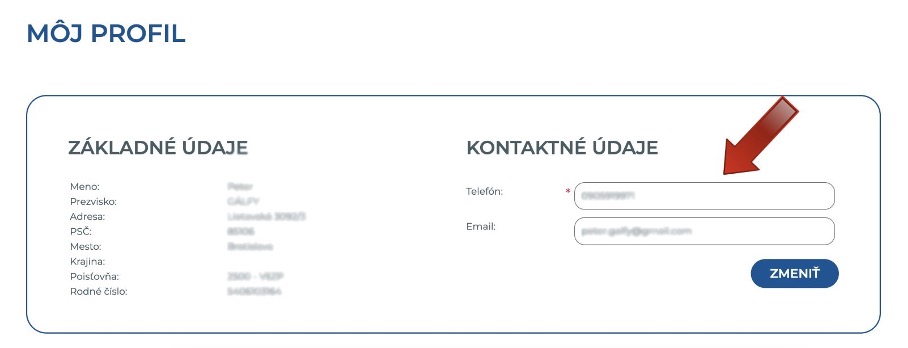
For changes to any other personal information, please contact the portal administration at info@eradiologia.sk
V tomto prípade je nutné kontaktovať správu portálu na info@eradiologia.sk . Do textu správy zadajte svoje identifikačné údaje - rodné číslo, meno a tel. číslo . Po zmene údajov Vás budeme kontaktovať s ich potvrdením.
19. WHAT SHOULD I DO IF I CHANGED MY PHONE NUMBER AND CAN´T ACCESS MY ACCOUNT?
In such cases, please contact the portal administration at info@eradiologia.sk. Include your identification details in the message, such as your birth ID no., name and phone number. Once the data has been updated, we will confirm the changes with you.
20. WHAT SHOULD I DO IF I PAID THE FEE BUT DIDN´T RECEIVE THE SMS CODE?
If you haven’t received a login code for the portal within 30 minutes of paying the fee, please refrain from sending another SMS. Instead, contact the portal administration at info@eradiologia.sk. Occasionally, SMS delivery may be blocked by mobile operators. If your code has already been generated, we can resend it to you upon request.
21. WHAT SHOULD I DO IF I CAN´T LOAD THE COMPLETE STUDY?
If you are unable to load the complete study, start by checking your internet connection.
In cases of two-area examinations (e.g., brain and spine scanned on the same day), images from both areas might be combined into one documentation. Please verify whether the images from the second area are included in the study.
If you did not undergo a two-area examination or cannot access images from the second examination, contact the portal administration at info@eradiologia.sk for assistance.
22. WHAT SHOULD I DO IF I CAN´T LOAD KEY IMAGES?
The "key image" option must be specifically selected and marked by the radiologist during the description process. It is not mandatory for every examination.
23. WHAT SHOULD I DO IF I HAVE AN APPLE COMPUTER RUNNING MACOS? What should I do if I have an Apple computer running macOS?
To view images on computers running Apple's macOS operating system, you will need to download a DICOM browser compatible with macOS. You can choose from the following two options:
Osirix https://www.osirix-viewer.com/
Horos https://horosproject.org/
24. MÔŽETE MOJE VÝSLEDKY ODOSLAŤ LEKÁROVI KVÔLI ĎALŠIEMU VYŠETRENIU?
Áno, výsledky vyšetrenia môžeme odoslať lekárovi po ich popísaní, ak ste si zvolili túto možnosť pri vypisovaní dotazníka pred MR vyšetrením. Váš lekár dostane výsledky vo svojej ordinácii, spravidla do 3-4 pracovných dní, v závislosti od služieb Slovenskej pošty.
Svoje výsledky si viete stiahnuť a vytlačiť priamo z portálu www.ERADIOLOGIA.sk a mať ich pri sebe pri každom vyšetrení. Rovnako si viete uložiť na USB kľúč aj obrazovú dokumentáciu, ktorá je prítomná pri popise ako možnosť „STIAHNUŤ KOMPLETNÚ ŠTÚDIU“. Potrebujete pomoc so stiahnutím nálezu? POSTUP.
25. PREČO NEDÁVATE NA PRACOVISKU CD? MÔJ LEKÁR POŽADUJE CD SO SNÍMKAMI.
Ak pracovisko nevydáva CD so snímkami z vyšetrenia, môže to byť spôsobené niekoľkými dôvodmi. Postupne prechádzajú všetky pracoviská magnetickej rezonancie v našej sieti na online platformu www.ERADIOLOGIA.sk . Snímky sú tu dostupné digitálne a bezpečne prenesené k pacientovi, ale i registrovanému lekárovi cez internet. Tento spôsob je rýchlejší a šetrí materiálové náklady.
Na CD nosiči sa nachádzajú snímky z vyšetrenia. Svoje snímky z vyšetrenia si viete stiahnuť na portáli (po prihlásení) do svojho počítača a následne napáliť na CD alebo uložiť na USB a priniesť svojmu lekárovi. POSTUP.
Platforma je určený pacientom, ale aj lekárom, ktorý na vyšetrenia pacientov odosielajú. Stačí ak sa lekár zaregistruje. Registrácia je zadarmo. Ihneď po popísaní snímok rádiológom je odosielaná notifikácia (môže si zvoliť jej periodicitu) a lekár nemusí čakať na pacienta, ktorý príde s CD až na vyšetrenie. Všetky nálezy má na jednom mieste, je tam jednoduchá orientácia. Rovnako vedia registrovaní lekári pomocou tejto služby vypĺňať žiadanky na MR vyšetrenie. Tento formulár je nastavený pre potreby recepcie, vopred vyplnený a vďaka tomu sa žiadanky dostávajú na recepcie lepšie vypísané.
CD sú jednorazový plastový materiál, a niektoré pracoviská ich už nevyužívajú v snahe byť ekologickejšie. CD mechaniky už nie sú štandardnou súčasťou moderných počítačov, čo môže byť nepraktické pre lekárov aj pacientov. Ak Váš lekár využíva špecializovaný systém (napríklad PACS - Picture Archiving and Communication System), pracovisko môže priamo zaslať snímky na jeho pracovisko. Táto požiadavka však musí byť vznesená ešte pred vyšetrením.
26. MUSÍM ŽIADAŤ O KÓD PRI KAŽDOM PRIHLÁSENÍ? MUSÍM PLATIŤ PRI KAŽDOM PRIHLÁSENÍ?
Platbu stačí uhradiť 1x, ak Vám po jej uhradení príde SMS kód, jeho platnosť je až 150 dní. Nie je nutné platbu opakovať pri každom prihlásení. Platnosť kódu, ktorý Vám príde SMS správou je 150 dní. Tento kód môžete používať na opakované prihlásenia počas tejto lehoty. Po 150 dňoch platnosť kódu vyprší a až vtedy je potrebné platbu opakovať a žiadať o nový prihlasovací (overovací) kód.
27. JE NUTNÉ ÍSŤ PO VÝSLEDKY OSOBNE?
Pre svoje výsledky z vyšetrenia už nemusíte opätovne navštíviť MR pracovisko, viete si ich stiahnuť jednoducho z pohodlia domova, na portáli www.ERADIOLOGIA.sk. Výsledky bývajú k dispozícii spravidla do 7. - 14. pracovných dní od vyšetrenia, po prihlásení do portálu. Profil na portáli vzniká až po popísaní snímok lekárom rádiológom. Je však možné zanechať vo formulári svoje prihlasovacie údaje a následne budete notifikovaní.
28. JE MOŽNÉ POSLAŤ VÝSLEDKY NA EMAIL?
Nálezy z MR vyšetrení posielame na email len vo výnimočných prípadoch. Na emailovú adresu je možné poslať len popis (textovú časť) výsledkov. Nie je možné takto odosielať snímky, kvôli obrovskému objemu dát, ktoré cez email neprejdú. Ak si želáte svoje výsledky prevziať elektronicky, slúži na to portál www.ERADIOLOGIA.sk kde po prihlásení pomocou rodného čísla nájdete svoj nález v textovej aj obrazovej forme, pripravený na stiahnutie/zdieľanie pre ďalšiu liečbu.


